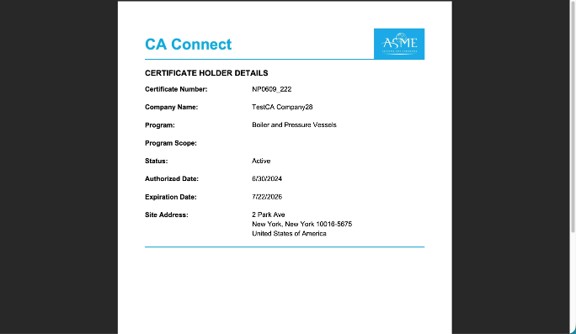
How to View and Download Your ASME Certification
This guide walks you through the process to access your ASME Conformity Assessment Certification. You must already have an ASME.org account and CA Connect access. To create an ASME.org account, please review the “Log In to CA Connect” guide.
How to View and Download Your ASME Certification
1. Navigate to the CA Connect home page. Ensure you are accessing the correct company workspace if you have access to more than one company.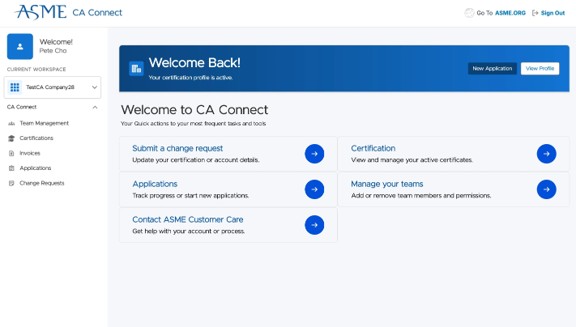
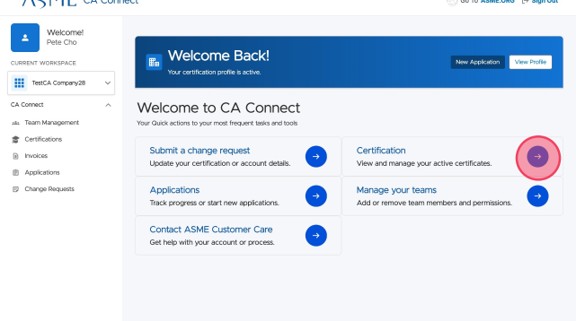
2. Click "Certification" from the main page to navigate to your certifications.
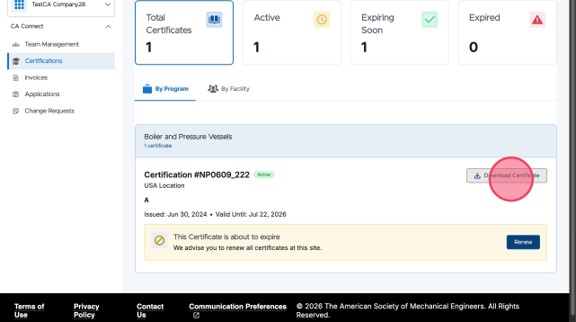
3. You can see all your certifications listed by program or by facility location.
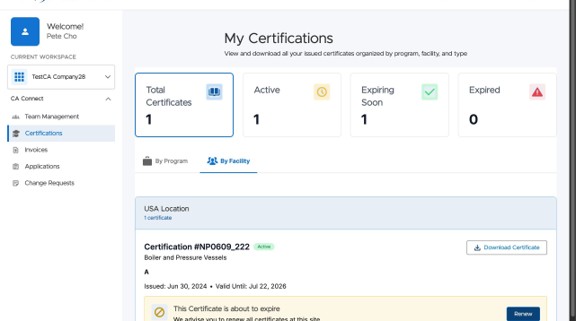
| Status | Definition |
| Active | Currently active Certification for that Program/Facility |
| Expiring Soon | Certification will expire within 9 months of the current date |
| Expired | Certification has expired |
4. Click "Download Certificate" to get a PDF of your certification. If you are unable to download your certification, or if you get an error, please contact ASME Customer Care.
5. Review your certification. If ANY information on your certification is incorrect or needs updating, please submit a Change Request. You can use the “Submit a Change Request” guide for instructions on how to do this.